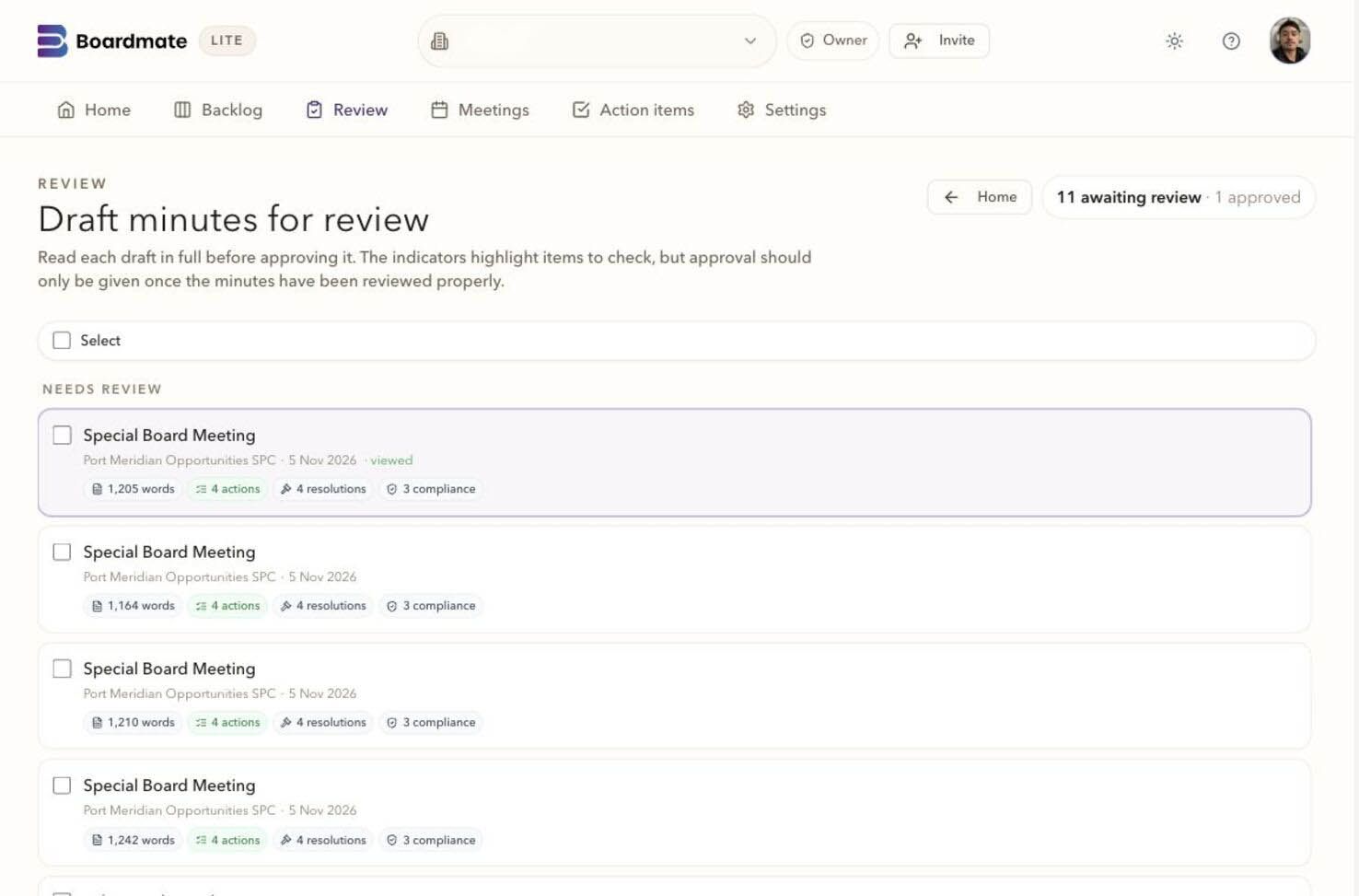
Keep Word as the practical file while Boardmate carries the governance history.
Use this when a team already knows how to produce minutes, but loses time reconciling inbox comments, tracked changes, final-final filenames, missing source context, and uncertain approval record.
01
Material to bring
A map of the current workflow from transcript and board pack to first draft, reviewer comments, revised minutes, chair approval, and filing.
Examples of recent reconciliation pain: conflicting markups, late comments, unclear no-comment status, or missing review record.
The DOCX quality standard expected by legal, board support, directors, or service provider teams.
A sample batch where the current email workflow can be compared honestly with the Boardmate workflow.
02
Boardmate checks
Does Boardmate remove manual reconciliation work without removing the board support team's judgement?
Can reviewers use a focused review link instead of scattering feedback across replies, attachments, calls, and markups?
Does the exported DOCX stay useful enough that Word remains the working file, not the repair shop?
Can the team explain what happened without relying on filenames and inbox memory?
03
Red flags
The team frames adoption as a preference contest between old software and new software rather than comparing outcomes.
Users keep emailing separate markups because the review experience is not clear or credible enough.
The product produces a draft but the team still rebuilds the approval record manually.
The first sample avoids the meetings where the current workflow actually breaks.
Result of the exercise
Current workflow
Where Word and email still work well, and where they create avoidable coordination risk.
Boardmate workflow
What becomes visible: source assumptions, reviewer activity, decisions, regeneration, exports, and audit.
Migration step
Lite backlog first, reviewer-control sample first, or Companion board cycle evaluation.
Boardmate view
Word and email work because everyone understands them. They also create hidden work: finding source material, reconciling tracked changes, chasing silent reviewers, deciding which comments count, producing final-final filenames, and explaining later why the minutes changed.
The strongest switching case respects the familiar DOCX output while comparing the whole workflow around that output. Boardmate makes source assumptions, review activity, chair decisions, regeneration, exports, and audit history easier to inspect than the current process.
Worked examples, checklists and planning tools
Switch detail
A good switching case respects the file people still need.
Word and email endure because they are familiar, flexible, and easy to circulate. The problem is usually the history around the file: which source was used, who reviewed, which comments counted, why a passage changed, and whether the final-final file can be explained later.
A useful switching article keeps the DOCX reality in view. Boardmate is stronger when the working file stays useful and source control, review control, chair decisions, regeneration, exports, and audit history move into a controlled workflow.
Map
Start with the current workflow as it really works.
The team names where source files live, how the first draft is made, how comments arrive, and who repairs the final record.
Compare
Measure hidden work around the file.
Drafting time, chase effort, comment reconciliation, DOCX repair, and approval clarity are better measures than general comfort with software.
Adopt
Change the highest-friction habit first.
Backlog clearance, review chaos, approval record, or live-cycle continuity can each be the first Boardmate use case.
How to run it
Compare the current workflow against Boardmate without caricaturing either one.
The best migration record comes from a side-by-side run that respects what works today and names exactly where Boardmate improves the workflow.
01
Map how minutes become final.
Map source collection, first draft, first check, reviewer circulation, comments, chair approval, exports, actions, and filing.
Workflow map
Friction points
Responsible people
02
Collect examples of friction.
Find recent cases with conflicting markups, late comments, no-comment uncertainty, file-name confusion, or missing source context.
Markup examples
Chase list
Version history
03
Run a Boardmate sample on the same kind of work.
Use source-folder preflight, generated minutes, private review links, chair decisions, regeneration, and DOCX export.
Preflight
Review activity
Export package
04
Inspect the DOCX honestly.
If the file needs heavy reconstruction, say so. If it needs ordinary final handling, the team can separate adoption anxiety from real output quality.
DOCX checks
Formatting work
Final handling
05
Choose the first operating change.
The answer may be Lite backlog first, reviewer links first, approval record first, or Boardmate Companion if the live cycle is the real issue.
Adoption step
Leadership sponsor
Next sample
Worked scenario
A switching comparison that lands.
A team chooses a meeting that recently produced two Word markups, a PDF comment, one late call note, and an unclear no-comment response. They run a Boardmate sample with the same source material and ask the same reviewers to use private links.
The final DOCX still needs normal legal read-through, but comment reconciliation is cleaner. The chair can see which comments were accepted, held, or rejected before regeneration. The adoption case becomes specific rather than ideological.
Kept
DOCX output, board support judgement, chair approval, and familiar final handling.
Moved
Source assumptions, reviewer activity, decisions, regeneration, and audit trail.
Measured
Draft time, chase effort, reconciliation load, DOCX repair, and confidence.
Chosen
First adoption step based on the pain the sample exposed.
A good result
Respect
The current process is mapped honestly before change is proposed.
Record
The sample compares workflow outcomes, not preference for old or new tools.
Continuity
DOCX remains useful as the working record.
Control
Review and chair decisions are easier to explain than inbox history.
Boardmate review
Use this guide to compare Boardmate with the current Word and email process on the work around the final DOCX.
Word continuity
DOCX remains the practical working file. Boardmate changes the workflow around that file, not the fact that a formal document is needed.
The product records why a later draft exists, including accepted reviewer comments, chair instructions, and structure decisions.
Adoption record
The first switch should be measured by source effort, reconciliation time, DOCX repair, reviewer clarity, and final-record confidence.
Worked example
Example comparison against the current workflow.
A board support team currently drafts in Word, sends the file by email, receives two tracked-change versions, one PDF markup, one call note, and one late supporting paper. The chair decides what to use, but the decision history lives across inboxes, filenames, and memory.
The Boardmate comparison keeps the final DOCX but changes the audit trail. The same reviewers use private links, comments stay attached to passages, uploads sit beside the issue, and regeneration only uses accepted input. The team can then compare effort and confidence without pretending Word has no value.
Manual pain
Reconciling comments, chasing silence, repairing filenames, and explaining late changes.
Boardmate record
Visible review activity, moderated input, version provenance, DOCX/PDF export, and audit history.
First move
Start with backlog, review-heavy meetings, or approval-record gaps, not the entire organisation.
Decision ledger
StageTeam questionBoardmate recordDecision
Map current workflow
Where does the existing process genuinely work and where does it strain?
Source locations, draft lead, review channels, reconciliation steps, final files, and approval record.
Do not switch a habit until the team can name the friction it wants to remove.
Run comparison
Does Boardmate reduce the hidden work around the file?
Will people keep emailing because the new workflow is unclear?
Reviewer instructions, link activity, no-comment confirmations, and chair decision queue.
Tighten reviewer roles before widening the workflow.
Adopt
What is the smallest workflow change that shows value?
One backlog tranche, one review-heavy meeting, or one approval-history problem.
Move from Lite to Companion only when the live cycle needs the same record continuity.
Watch points
False replacement story A sound switching story respects Word as the final working file and moves the governance history out of filenames and email.
Shadow process If reviewers keep sending separate markups, the product has not yet earned trust.
Output-only test A nice first draft does not show the switch unless review, regeneration, and audit are also better.
Boardroom wording
To existing users You still get a working DOCX. The change is how review input reaches the final version.
To the sponsor We should measure time to draft, reconciliation load, reviewer clarity, and audit confidence.
To the chair Boardmate makes your decision point visible instead of burying it in a final-final file.
Boardmate toolkit
Compare the audit trail and the software habit.
A credible switching guide respects Word because the DOCX still matters. Boardmate changes the workflow around the file: source assumptions, reviewer activity, chair decisions, regeneration, exports, and audit trail become easier to explain.
Briefing note
The current process is mapped before it is criticised.
The team writes down how minutes move today from source material to final file. The point is to identify hidden work: chasing, reconciling, interpreting silence, repairing document structure, and proving why a passage changed.
Current workflow
Source locations, first draft lead, review channels, chair approval, final filing, and record gaps.
Time saved, reconciliation removed, reviewer clarity, DOCX handling, and confidence in the final record.
Preflight
Source assumptions before draft
Boardmate makes source assumptions visible before minutes are judged, instead of burying them in the drafter's memory.
Review
Comments outside inboxes
Private links reduce the number of replies, markups, call notes, and final-final attachments that have to be reconciled.
Decision
Chair-controlled regeneration
The chair or delegate chooses accepted feedback before the next draft exists.
File
DOCX remains the working artefact
The switch is credible only if the exported DOCX can be used by the people who own the formal record.
Role by role
Current drafter
Map where the manual process takes time and where Word still works well.
Draft time, markup count, chase list, file versions, and final DOCX repair work. Reviewers
Use one Boardmate sample instead of parallel email markups.
Link opens, passage comments, uploads, and no-comment confirmations. Chair
Compare decision control across email and Boardmate.
Accepted, held, and rejected comments before regeneration. Leadership sponsor
Choose the smallest workflow change that shows value.
Backlog workflow, review workflow, approval-review workflow, or Companion workspace.
Decision route
Attachment chaos
The current workflow relies on filenames, tracked changes, call notes, and memory to explain the final version.
Run a side-by-side sample. Partial improvement
Boardmate improves first draft speed but reviewers still email parallel markups.
Tighten the reviewer invitation and chair decision point. Workflow improvement
Boardmate reduces chasing and reconciliation while preserving a usable DOCX.
Adopt the workflow for a defined backlog or review-heavy meeting type. Repeatable workflow
The team can explain source, review, decisions, exports, and audit without inbox search.
Use the record to consider wider Lite or Companion use.
Record note
Switching comparison note
This note keeps the discussion away from preference and close to record.
Old workflow
Two Word markups, one PDF comment, one call note, one late paper, and uncertain no-comment response.
Boardmate workflow
Private links, attached comments, support upload, chair decision queue, regenerated draft, DOCX and audit.
Kept
DOCX output, board support judgement, legal read-through, and chair approval.
Changed
Source assumptions, reviewer history, decision record, and final file explanation.
Avoid
False replacement The strongest story keeps Word where it is useful and changes the history around it.
Comfort debate Adoption stalls when the team compares familiarity rather than outcomes.
Shadow markups If reviewers keep emailing separate files, the workflow has not won yet.
Output-only test A good draft does not show the switch unless review, regeneration, and audit improve too.
Current workflow
Map the process people actually use.
Before asking anyone to switch, write down the real workflow. Where do transcripts, recordings, board packs, separate reports, support notes, and action lists live? Who prepares the first draft? Who checks it before circulation? How do comments come back? Who reconciles conflicting markups? Where are final DOCX, PDF, actions, and approval records filed?
This map often reveals that the current workflow depends on a small number of people holding memory in their heads. That is useful to know. The adoption case becomes clearer when the team can point to specific coordination risks rather than making a general claim that a new tool is better.
Map these handoffs
Source collection and first-draft preparation.
Team check before reviewer circulation.
Reviewer comments, uploads, no-comment status, and late changes.
Chair approval, final file creation, actions, and filing.
Process comparison
Manual workflow
Where inboxes, markups, filenames, and memory carry record.
Boardmate workflow
Where source, review, decisions, regeneration, exports, and audit become visible.
Transition risk
Where people may continue emailing unless the review experience feels credible.
Review change
Move comments into a moderated review workflow.
The biggest practical shift is often review discipline. Email allows every reviewer to respond in a different shape. Boardmate gives them a focused task: read, comment on a passage, upload support, or confirm no comments. Board support can then triage record instead of reconstructing it.
The chair decision is the cultural hinge. Reviewers provide corrections and supporting detail. The chair or delegate decides what changes the record. Making that visible helps teams move away from the idea that every tracked change has equal authority.
Compare review workflows by asking
How many places can comments arrive today?
How does the team know who has no comments?
How are conflicting comments resolved?
Can the final record explain which comments were accepted and why?
DOCX continuity
Judge whether the exported file reduces real work.
A switching evaluation should open the DOCX and treat it as a working file. If Boardmate produces a document that still needs heavy repair, adoption will feel cosmetic. If the file is structurally useful, the product can reduce drafting and reconciliation work while keeping the familiar artefact that the organisation still needs.
The test should also check whether PDF, actions, and audit history stay connected. Many manual processes preserve the final file but lose the history around it. The stronger outcome is a final package that can be inspected without reopening old email chains.
Output comparison
DOCX usefulness without heavy reconstruction.
PDF reading copy for circulation or evaluation.
Action extraction and carry-forward record.
Audit history linked to source, review, decisions, and export.
Adoption record
Time
Where first-draft, chase, reconciliation, and export effort changed.
Control
Where review and chair decisions became clearer.
Trust
Whether the final package is easier to explain than inbox history.
Change plan
Start where the current workflow already hurts.
The easiest first step is the point of highest friction. If the problem is a historic backlog, start with Lite. If the problem is review chaos, start with private links and chair-controlled regeneration. If the problem is board cycle continuity, use the sample to decide whether Boardmate Companion belongs in the next conversation.
Change one habit at a time. Keep Word output familiar, show that review and records improve, then widen the workflow when the team has a concrete reason to do it.
Good first switching scopes
One backlog tranche with known source material.
One review-heavy meeting where email reconciliation is painful.
One governance workflow that needs a clearer approval record.
One live-cycle discussion where minutes, actions, packs, and approvals need continuity.
Questions to settle
Which part of the current Word and email workflow causes the most wasted time?
Which final DOCX qualities are non-negotiable?
Where do comments currently arrive and who reconciles them?
What is missing when someone asks how a final passage changed?
Should the first move be Lite backlog clearance, reviewer control, or the wider Companion workspace?
The difference is easiest to see beside the current workflow: source material, review, regeneration, export, and the record that carries forward.
Area
Boardmate
Ad hoc process
Record
Source material is named, matched, and visible before drafting.
Records live in folders, inboxes, and local document versions.
Review
Comments stay attached to passages and reviewers are tracked.
Feedback is reconciled from emails, markups, and meeting notes.
Regeneration
Accepted comments become controlled source material for the next draft.
The drafter manually decides which edits made it into the file.
Audit
Exports, actions, reviewer activity, and audit history travel together.
The final minutes and the review record can drift apart.
Continuity
Keep Word where it is still the practical file.
Many board support teams need DOCX because directors, lawyers, administrators, and client filing routines still expect it. Boardmate keeps the working file familiar and makes the work behind that file more controlled.
Use Boardmate to draft, review, regenerate, and export the working DOCX.
Keep PDF available for stable circulation or file copies.
Check whether the exported DOCX needs only normal final handling, not heavy reconstruction.
Keep the approved minutes, export history, and audit history beside the working file.
What stays
A familiar DOCX output, board support judgement, chair approval, and formal record ownership.
What changes
Source matching, review routing, comment decisions, regeneration record, and export history become visible.
Current process
Map the inbox version of the workflow first.
Before changing tools, write down how the current process really works. The messy parts are often invisible until someone must explain why one comment was included and another was missed.
Where transcripts, board packs, support notes, and separate reports are stored.
Who prepares the first draft and who checks it before circulation.
How reviewers receive drafts and how comments arrive back.
How conflicting markups are reconciled.
How the final DOCX, PDF, actions, and approval record are filed.
Review workflow
Move comments out of scattered threads.
Email threads make review feel familiar but they scatter record. Boardmate gives reviewers a focused place for passage comments, uploads, and no-comment confirmations while keeping board support in control of the next version.
Email workflow
Comments arrive as replies, attachments, tracked changes, side notes, or calls.
Boardmate workflow
Comments sit beside the draft, reviewer activity is visible, and chair decisions control regeneration.
Transition tactic
Start with one sample batch and compare how long reconciliation takes in both workflows.
Version control
Stop making the file name carry the governance history.
Working filenames often become the only record of what happened: final, final marked-up, chair final, revised final, final approved. A controlled workflow uses audit history instead of file names to explain review decisions.
Keep the generated draft, accepted comments, regeneration step, and export event connected.
Record when a reviewer has no comments so silence is not confused with approval.
Keep rejected or held comments visible to the authorised user.
Use the audit trail to explain how the approved file was reached.
Adoption
Start with the point of highest friction.
The best switch starts where the current process costs the most time or carries the most risk, then tests the workflow on real material.
Backlog
Use Lite when historic minutes are delayed and source material is already assembled.
Reviewer chaos
Use private links when feedback currently arrives through too many channels.
Approval record
Use chair-controlled regeneration and audit history when sign-off needs clearer record.
Live cycle
Move into Companion when agendas, board packs, actions, and minutes need one continuing workspace.
Decision record
Compare outcomes across both workflows.
Some users will prefer the old process because it is familiar. The evaluation should compare outcomes: time to first draft, number of reconciliation steps, reviewer response clarity, DOCX usefulness, and confidence in the final record.
Run one representative sample through Boardmate and compare it with the current workflow.
Record where Word and email still work well.
Record where Boardmate removes avoidable coordination work.
Use the result to decide whether Lite, Companion, or a narrower pilot is the right next step.
Common questions
Switching questions for Word and email teams.
Does Boardmate replace Word output?
No. DOCX remains the practical working output. Boardmate changes how the source material, review, decisions, export, and audit history are managed before the file leaves.
What changes for reviewers?
Reviewers can use a private link for a focused draft review. Invited collaborators can return to shared meetings, feedback and requests in their own workspace.
What is the biggest operational gain?
Board support spends less time chasing replies, comparing versions, and manually carrying accepted feedback into the next draft.


 Boardmate