

Colleagues reviewing meeting material together.

Working together

Your part of the meeting, clearly in view.

A focused workspace for directors, reviewers and service providers to read shared minutes, respond to requests and return material to the meeting team.

01 Requests

See what is needed and when it is due.

02 Minutes

Read the published draft and send considered feedback.

03 Contributions

Return a file or written update for the meeting team to review.

Collaborator workspace at a glance

  1. Open the requests that need your reply.

  2. Read the draft minutes shared with you.

  3. Send feedback for the meeting team to consider.

  4. Return a file or a written update against the right request.

  5. See what has been received and accepted.

  6. Keep access limited to the meetings shared with you.

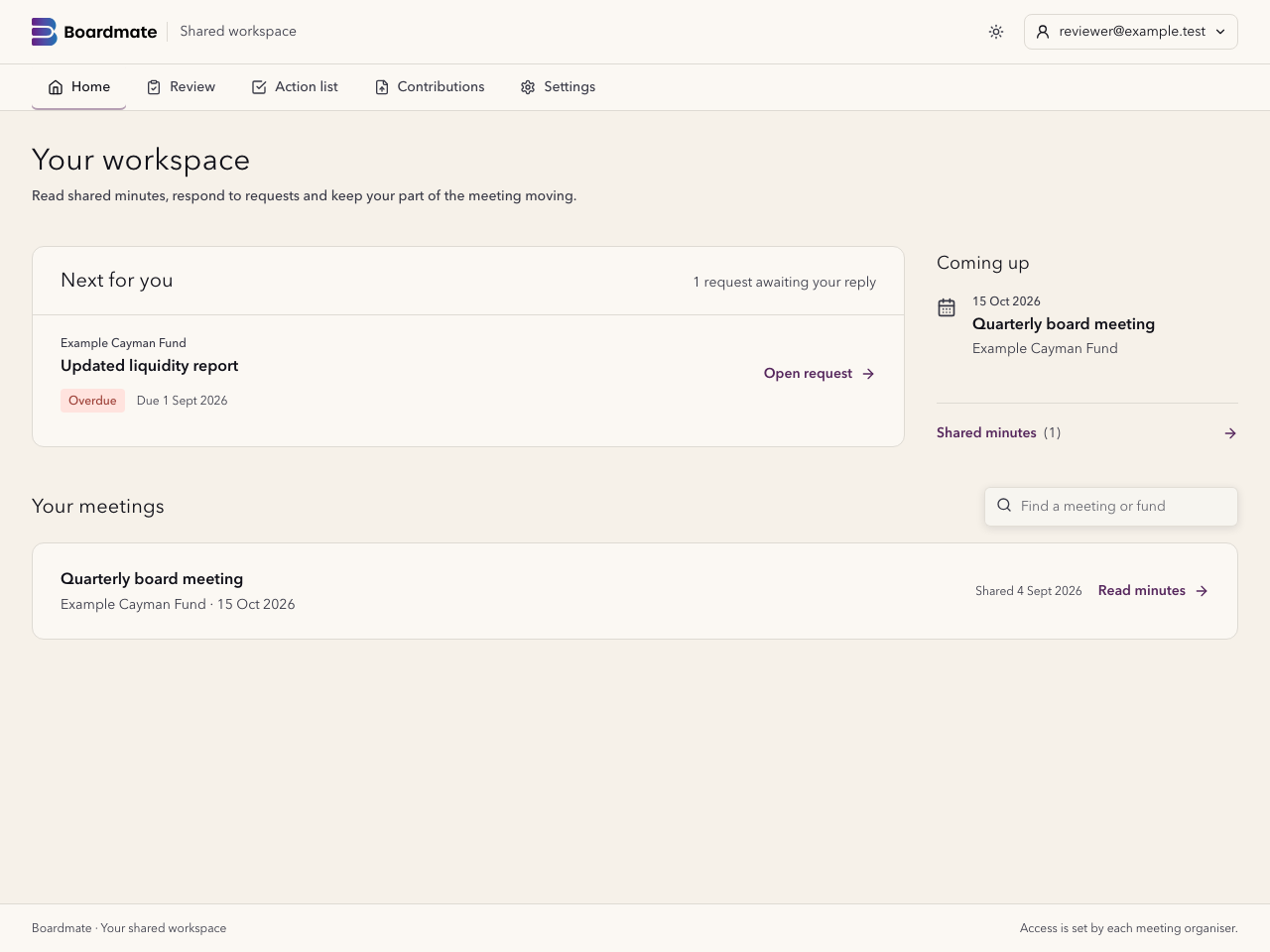
Boardmate collaborator workspace with the next request, upcoming meeting and shared minutes.
The collaborator workspace brings requests and shared minutes together. Illustrative meeting data.

Start with what needs your attention

Your home shows requests awaiting your reply, their due dates and your upcoming meetings. Open a request to see what is needed, or go straight to the minutes shared with you.

  • Find the right meeting by its title or fund.
  • See overdue requests and material already with the meeting team.
  • Keep your contributions and action-related requests in one place.

Read the minutes and leave considered feedback

A clear reading view keeps the published draft beside your feedback. The meeting team decides what to accept and incorporate into the next version.

Shared draft

Read the version the organiser has made available to you.

Your feedback

Add a comment or confirm your review without changing the minutes yourself.

Clear responsibility

The chair or delegated team retains control of revisions and approval.

Return a report, a file or a written update

Open the request, read the instructions and send your update to the meeting team. Attach a PDF, Word document, Excel file or text file where needed. The team reviews the submission before accepting it into the pack.

  • Request status shows whether material is awaited, received or accepted.
  • An update against an action goes to the team for review before the action is closed.
  • Each organiser decides which meetings and material are shared with you.

A workspace suited to the job

Collaborators see their shared meetings and requests. Board support uses Companion to manage invitations, review contributions and prepare the pack. Lite remains the focused workspace for clearing historic minutes backlogs.

Common questions

Questions about this Boardmate workflow.

Is there an extra charge for client and contributor participation?

Clients and contributors can review minutes, give feedback and contribute to upcoming meetings at no extra charge.

Does a collaborator need access to our whole organisation?

No. Access is assigned for the relevant meetings. Collaborators see the material and requests the organiser shares with them.

Does sending an update close an action or add a file to the pack?

The meeting team reviews the update first. Acceptance into the pack and closure of an action remain separate decisions.